How I Work with AI Agents: Handoffs and Rules
Contents
Contents
TL;DR
- Keep the context window small. Hand off at ~30% to a fresh session with a one-page handoff file: a fresh session that reads a handoff beats a full session that has “seen everything”.
- Shrink what the agent reads at the source. A hook filters shell output, the search tool matches the question, and rules live in the instructions file. A habit the agent has to remember is a habit it forgets.
- State lives outside the chat. The tracker is the source of truth, rules are written from failures that actually cost time, and gotchas go in a file that survives a
/clear. - An orchestrator now runs the other agents. Through herdr’s CLI it opens workspaces, starts, briefs, reviews and clears worker agents; my part is approving PRs and taking decisions.
Agents write code fast. The slow part now is giving them the right context, keeping them inside the rules, and checking what they did. This post covers the habits I use for that, and why each one exists. The config itself (hooks, scripts, commands, pinned to tool versions) is in a dated companion: My AI Agent Setup (October 2026).
The same habits run at two scales. At home it’s a few hobby repos. At work it’s around 14 Claude Code sessions open at once, and an orchestrator agent now starts, briefs and clears the others itself (see The orchestrator drives the terminal). Only the hobby setup is shown in detail.
It’s written for someone who already uses an agent CLI and keeps running out of context or losing track of state between sessions.
For why the work shifted this way, and what the industry evidence says, see the companion post: From Programmers to Orchestrators.
Examples use Claude Code. Most of it transfers to any agent CLI that supports hooks and an instructions file.
Context is the budget
Everything below follows from one rule: keep the context window small.
- Quality. In my experience models handle a long context worse than a short one (I haven’t measured it). Instructions from the start get diluted by pages of tool output.
- Not cost, mostly. The whole context is sent again on every turn, but prompt caching makes resending the same prefix cheap, and on a seat plan I’m not billed per token anyway. Quality is the argument that holds.
- So I hand off at ~30%. A fresh session that reads a one-page handoff beats a full session that has “seen everything”.
Auto-compact is off on purpose. A compaction summary is written by the model, at the worst moment, with no review. A handoff is a file I can read.
Tools that shrink what the agent reads
Most context is tool output, not conversation. So the cheapest place to save context is at the source, before the agent reads anything:
- Filter shell output. A hook pipes every shell command through a filter (rtk) that strips the noise from
git,lsand test runners. The agent never has to remember to use it. - Pick the search tool by the question. Plain text goes to
rg. A syntax shape, like every call of a function, goes toast-grep. A symbol with its callers goes to a code graph (CodeGraph). JSON goes throughjq. Grepping for a name and then reading five files is the most expensive option. - Write the rule down. “Use the code graph before grep” lives in the global
CLAUDE.md. A habit the agent has to remember is a habit it forgets.
The hooks, the search table and the exact rule are in the setup post.
Concise output style
Claude Code has a built-in Concise output style: lead with the result, no preamble, no recap. I set it once, globally. The same rule goes in each repo’s instructions, so it also binds other agents. The wording is in the setup post.
- Saves: output tokens, and your reading time.
- Costs: you sometimes have to ask “why?”. That’s a cheap question.
The statusline: see the number
You can’t hand off at 30% if you can’t see 30%. My statusline shows the model, a context bar, and the plan’s 5-hour and weekly usage.
The colours don’t mark 30%. I watch the number. The script is in the setup post.
The handoff loop
At ~30% context:
- Run
/handoff, optionally with what the next session is for:/handoff finish the review fixes. - Run
/clear. - Type “work from this handoff” and give the path.
/handoff is a skill from Matt Pocock’s set. It compacts the conversation into a document for a fresh agent:
- Saved outside the repo, in the OS temp directory, so handoffs don’t pile up in the working tree.
- Links instead of copying. Anything already in a spec, ADR, issue, commit or diff is referenced by path or URL, not restated. The handoff is an index, not a copy.
- Suggested skills. It names the skills the next session should load, so the new agent starts in the right workflow.
- Redacted. API keys, passwords and personal data are left out.
Before I clear, I check the handoff answers these questions. If one is missing, I ask for it:
- State: what exists right now, and is it deployed?
- In flight / blocked: what's waiting, and on whom?
- Next actions, in order: can the next session start without asking?
- Believed but not measured: where does the code embody a guess?
- Gotchas: what silently does the wrong thing?
- Open questions: which decisions aren't the agent's to make?
Matt Pocock’s skills
Skills are packaged instructions an agent loads when a task matches. I use Matt Pocock’s skills for most of the work loop: interview me about a plan, turn it into a spec and tickets, build test-first, review the diff against the spec, and hand off. The full list by stage is in the setup post.
Skills fit the context rule: an agent only loads a skill when it needs it, instead of carrying every workflow in its instructions.
State lives outside the chat
The chat is disposable. Anything that must survive a /clear lives in a file or in the tracker.
The tracker is the source of truth. GitHub Issues for hobby projects, Jira at work. Every issue is written as a brief an agent can act on:
## Why
The problem, and why it matters now.

## Outline
The steps or sections, in order.

## Done when
- Checkable conditions. Not "improve X", but "X passes Y".
Every kind of doc helps an agent. Each answers a question the agent would otherwise guess at:
| Doc | Answers |
|---|---|
AGENTS.md / CLAUDE.md | What are the rules here? |
CONTEXT.md | What do the domain words mean? |
docs/adr/ | What was decided, and what was rejected? |
docs/research/ | What did we learn that informs, but doesn’t settle, a decision? |
| Findings | What would nobody have guessed? |
| Execution logs, with the reasoning | What actually happened in the last run, and why? |
gotchas.md | What silently does the wrong thing? |
A gotchas entry is one line each of symptom, cause and fix:
- **`pkill -f <pattern>` matches the shell running it** and kills your own
  session. Use a bracket pattern (`pkill -f "[u]vicorn"`) or kill by PID.
Memory is for preferences only. How I like to work goes in memory. Facts about the code go in the repo, where they get reviewed.
Rules written from failures
My AGENTS.md rules aren’t best practices from a book. Each one exists because an agent did the opposite and it cost time. The core set:
- Verify before you claim. “The tests should pass” isn’t a result. Run the command, read the output, quote the decisive line.
- Exercise the real path. Moved a file? Run the tests and the entry point. Changed a default? Print the resolved value.
- Never suppress a diagnostic to make it quiet. No bare
# noqa, no widening the lint ignore list, noskip. A suppression names one code and states its reason on the same line. - Delete workarounds when the reason is gone. Leaving both the fix and the shim is worse than either: the next reader can’t tell which path is real.
- Stay inside the scope you were given. Mention the other bug; don’t fix it in the same change.
Rules get better when they carry their evidence. “Don’t use a first-byte-only watchdog” is easy to ignore. “One stall ran for 15,319 seconds under a 120-second first-byte deadline” isn’t.
Before merge, new code goes through a review checklist filled row by row. That process is its own post: An Opinionated Python Code Review Guide.
Orchestrator and executor
On some repos I split the work between two agents. The orchestrator plans and reviews. The executor (OpenCode, run headless) writes every byte. The orchestrator isn’t allowed to edit source, not even a one-character typo.
That rule sounds extreme. It exists because a hand fix makes the execution log stop describing the tree, and every later review then reasons about a state that isn’t on disk.
The loop is a small state machine:
PLAN → EXECUTE → REVIEW → { COMPLETE | CORRECT }
- Plan. Write the steps into
TODO_PLAN.md, each with its files and an acceptance command. Exactly one step isACTIVE. - Execute. Send the executor one self-contained brief for the active step. If the brief has an “and then”, it’s two steps.
- Review. Read the
git diffand the log. Never the executor’s summary alone. - Correct. Send what’s wrong and what right looks like into the same session. After three failed corrections, the step is
BLOCKEDand a human decides.
Every brief starts with the same line, for a reason explained below:
You are the executor. Do not read AGENTS.md or .orchestrator/.
Do not run opencode. Do not edit .orchestrator/*.
Hung executor runs are detected by output growth, not by elapsed time. The wrapper allows 120 seconds to the first byte and then 300 seconds between bytes, and retries up to three times. Stray processes still get swept by hand:
# List every executor process with its age and CPU; kill by PID, never pkill -f
pgrep -x opencode | while read p; do ps -o pid=,etimes=,%cpu= -p "$p"; done
The orchestrator drives the terminal
Until recently, “orchestrator” in this post meant an agent that wrote briefs and a human who carried them to the other sessions. That changed when herdr, the terminal workspace manager I run every agent in, got a CLI that agents can call.
herdr organises terminals into workspaces (herdr’s sidebar calls them spaces), each with tabs, each split into panes. It recognises the coding agent running in a pane and tracks its state. Since the CLI talks to the same session the agent runs in, the orchestrator can now do what I used to do by hand:
- Make room. Create a workspace or tab for a task, or split a pane.
- Staff it. Start a Claude Code (or Codex, OpenCode, Gemini…) agent in that pane, with a name.
- Brief it. Send the prompt and wait until the agent settles.
- Check it. Read its terminal output, then read the
git diff. - Reuse it. Clear its context and hand it the next task.
Here’s a test run on a toy repo. The orchestrator opened a space per task (t1, t2, t3, each on its own worktree branch), started a Sonnet worker in each, and briefed all three. The orchestrator was a Claude Code session driving this herdr session through its socket. The right pane shows the commands it ran, with the JSON trimmed to the interesting fields. The sidebar is herdr’s view of the workers:
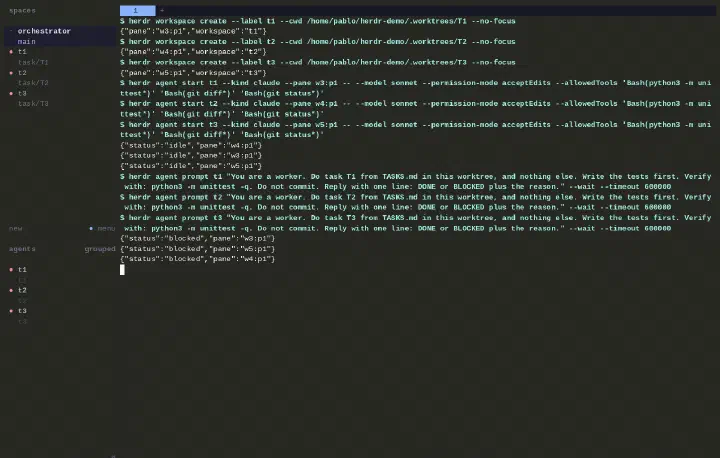
What the CLI gives the orchestrator
Two things make this work:
- Every call returns JSON. The orchestrator reads workspace and pane IDs from the response instead of guessing them.
- herdr knows each agent’s state. It reports
working,idle,done,blockedorunknown. The orchestrator leaves a working agent alone, reviews an idle or done one, and brings a blocked one to me. A brief is never typed into a blocked agent, so it can’t accidentally answer somebody else’s approval dialog.
The commands and the state table are in the setup post.
The loop
The orchestrator stops being a worker and becomes a dispatcher. Its context holds an index of tasks, not the tasks themselves:
- Read the tracker and the plan. Pick the tasks that don’t depend on each other.
- For each one: a worktree, a workspace, a named worker, a brief.
agent waiton the workers. Whoever settles first gets reviewed first: the diff, the tests, the log.- Good: the worker opens the PR. Wrong: a correction goes into the same session.
- Clear the worker and give it the next task from the index.
Clearing a worker through the CLI has one catch, covered in the setup post.
The workers burn context. The orchestrator should burn much less, since it only holds briefs, statuses and review notes. I haven’t measured how much longer that lets it go before it needs its own handoff.
The same run, from the first workspace create to three workers asking for approval, in about 45 seconds:
Every worker stopped at the same place: its first shell command. That’s the blocked state doing its job:
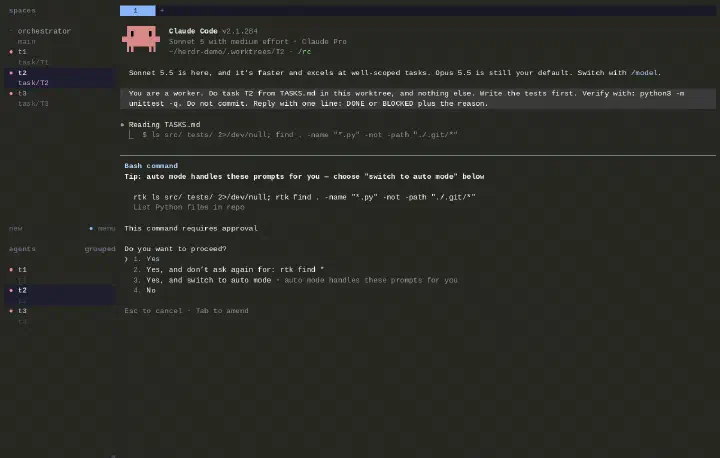
At work that doesn’t happen, and the reason is boring: every “Yes, and don’t ask again” is saved in the project’s .claude/settings.local.json, and my work folders have months of those answers. A fresh git worktree has none, because that file isn’t tracked. So I gave each worktree a narrow allowlist (read-only commands, the test command, git diff; the exact list is in the setup post) and ran it again.
Those months of answers are also permission creep: each one was reasonable on the day, nobody reviews the pile, and it contradicts the least access rule below. The narrow allowlist is the better model, because it’s short and written on purpose. The accumulated lists in my main checkouts should shrink to match it.
Second run: all three workers went from working to done without asking anything. The orchestrator read the three diffs, ran the tests in each worktree, then cleared t1 and gave it the fourth task:
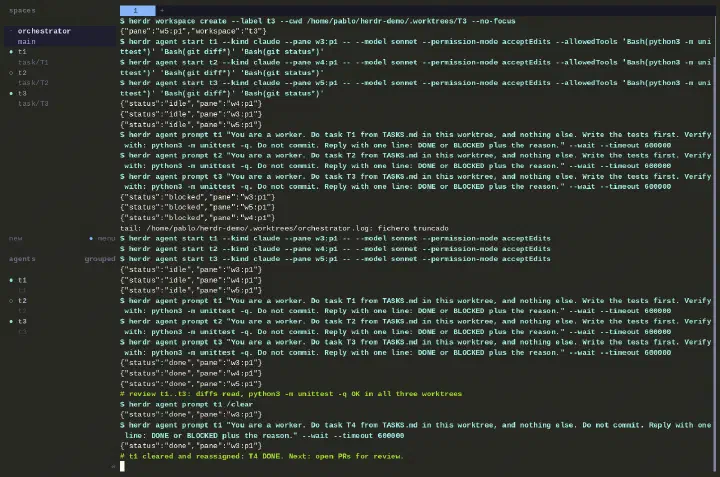
The log pane still shows the first run above the second: same session, same log.
What’s left for me
I tried this at work with Opus 5.5 as the orchestrator. It created workspaces on the fly, briefed the other agents, cleared their context when a task was done and handed them the next one. With the tools the job needs available to the workers (Playwright to check the UI, kubectl, the AWS CLI), my part shrank to two things:
- Approving PRs. Reading the diff is still mine. The orchestrator’s review is a filter before mine, not a replacement for it. The orchestrator and the workers come from the same model family, so when the orchestrator approves a worker’s diff, that’s close to the “one opinion stated twice” problem: they share blind spots. The tests and my own read of the diff are the independent checks.
- Taking decisions. A
blockedworker, or a question the brief didn’t answer, lands on me.
Everything in Orchestrator and executor still applies. The difference is who carries the briefs.
Guardrails
An agent that can start agents needs a few extra rules:
- Least access per worker. A worker that only needs to read a cluster gets a read-only kubeconfig, not mine. Anything that touches production or spends money goes through a
blockedapproval to a human. - Close only what you created. The orchestrator may clean up the workspaces it opened. Mine are off limits.
- Background by default. Every create uses
--no-focus, so the orchestrator never pulls the screen away from what I’m reading. - Experiment in a named session.
herdr --session demoruns a separate server with its own socket, and panes inside it talk to that socket by default. It keeps a test run away from your real workspaces. It isn’t a security boundary: both sockets belong to the same user. - Read the diff, not the transcript.
agent readshows what the worker said. The tree shows what it did.
Scaling out
- A git worktree per task. Parallel sessions never share a working tree, so they can’t overwrite each other’s changes.
- A terminal workspace manager. herdr runs each agent in a pane and shows each agent’s state, so I see who’s waiting on me without checking every pane. Its CLI lets the orchestrator do the same.
- Sessions that talk. Claude Code sessions can message each other, which is how two agents avoid editing the same thing.
At work the same habits scale to about 14 Claude sessions, dispatched by one orchestrator through herdr, with Jira as the tracker.
What broke
The setup is a list of fixes for things that went wrong. These are the ones worth knowing about. Version-specific quirks are in the setup post’s gotchas.
The executor’s summary contradicted its own log. One run ended with “the commit-message file didn’t exist, so I didn’t commit”, directly below its own successful commit hash. Another listed changed files and left one out. That’s why review reads the
git diff, never the summary.Runs hang silently. Eighteen hangs measured between 324 seconds and 15,319 seconds, all at 0.2 to 2.1% CPU. Elapsed time carries no signal. A four-hour stall and a five-minute stall are the same bug, which is why the watchdog measures output growth. Three abandoned processes were once found still alive after 13.7, 12.8 and 3.3 hours.
A quota error looked exactly like a hang. The provider rejected the request, the executor swallowed the error, printed nothing and stayed alive. The watchdog would have spent all three retries on an error no retry can clear. Now it checks the provider log for errors before calling silence a stall.
The executor promoted itself. It read the orchestrator’s rulebook, concluded it was the orchestrator, launched its own nested executor and edited the plan file. Hence the “You are the executor” line at the top of every brief.
The token filter hid a green test suite.
rtk pytestreported “No tests collected” on a suite that passes. It reads like a real failure, so the executor retried it for about ten minutes. Acceptance checks now run unfiltered, and every brief says so.The permission layer said no, correctly. In auto mode, Claude Code refused:
- to let the orchestrator add its own allow rule (“Self-Modification”);
- to start a worker before I’d allowed the herdr commands, and later to start a second orchestrator in auto mode (“Create Unsafe Agents”);
- to let the orchestrator answer the workers’ approval prompts for them.
All of those are the right defaults. Allowing the herdr commands is my decision in
settings.json, and ablockedworker is mine to answer.A narrow allowlist blocks on the first look around. I started workers with only the test command and
git diffallowed. Each one first ranlsandfindto orient itself, and blocked there. A worker needs its read-only commands allowed too, or a permission mode that fits the task.A state change isn’t proof the turn is over. Once, herdr reported a worker
donewhile its spinner was still running. The orchestrator now waits until the worker’s reply line (DONEorBLOCKED) is actually on screen, and doesn’t stop at the state change.I broke my own step 1. I gave
t1the README task, which documents functions fromt2andt3, in a worktree that had neither. The worker noticed and documented them from the spec. The right move was to merge T2 and T3 first, or mark T4 as blocked until they merged.The worker’s reply was right; my suspicion was wrong.
t3answered “already existed” over a 22-line diff. It looked like the old summary-versus-log problem, but the code came from the first run’st3, which had finished before it exited. Reading the diff settled it in a minute.
The last cost is the plainest one: all of this is setup. Hooks, rules, templates and a wrapper script are work, and each one exists because the version without it failed first.
What I haven’t measured
The companion post cites a trial where developers felt faster and were slower, and tells you to measure what reaches users. This post doesn’t do that for my own setup. At work the delivery numbers are tracked (defects, rework, review time, bugs that escaped to production), but the project is under NDA, so they stay out of this post.
So read everything above as “this removed friction I could see”, not as proof that the output got better. If you copy the setup, pick one of those numbers first and check it again a month later.
Copy the setup
The config, a setup checklist and the version-specific gotchas are in My AI Agent Setup (October 2026). Start with two habits, not the whole list: hand off at 30%, and add a line to gotchas.md the first time something costs you more than a few minutes.
If you have questions or a setup that works better, let me know.